
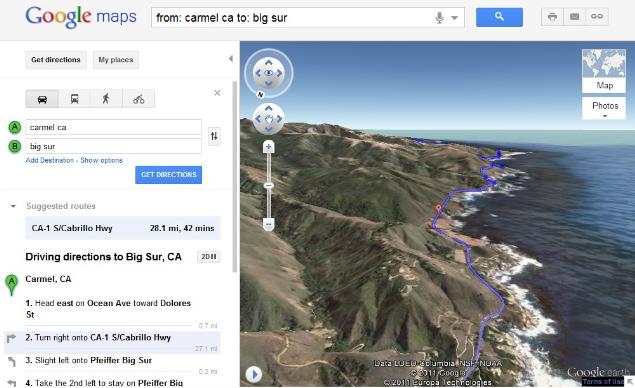
“The map will switch to Earth view and automatically start flying you along your recommended route,” Google Maps engineer Paul Yang explains in a blog post. “To help you keep track of which step you are on, the current leg of the trip is highlighted in the left panel. You can also jump to a different part of the trip by clicking on a different step.”
Users can also pause the 3D preview by poking about off-route areas, all the while remaining in the 3D Earth view. They also can return to the standard two-dimensional view by clicking on the 2D button in the left-hand directions panel. 3D route previews, on first glance, appear to mash up the Google Earth and Google Maps experiences quite nicely. Take a trip of your own and let us know your thoughts in the comments.


That is super information! Thanks for sharing! I’m going to Tweet about your blog.
ReplyDeleteNice Information! I personally really appreciate your article. This is a great website. I will make sure that I stop back again!.
ReplyDeletenewest tech
I don’t know how should I give you thanks! I am totally stunned by your article. You saved my time. Thanks a million for sharing this article.
ReplyDeleteBlogging is the new poetry. I find it wonderful and amazing in many ways.
ReplyDeleteHello there! Extremely good article! I’m a usual visitor to your blog. Keep up the fantastic work.
ReplyDeletevery informative post for me as I am always looking for new content that can help me and my knowledge grow better.
ReplyDeleteThis is the precise weblog for anybody UN agency must search out out concerning this subject. You notice such a lot its nearly arduous to argue with you. You completely place a spanking new spin on a topic that is been written concerning for years. Nice stuff, merely nice!
ReplyDeleteI really appreciate your skilled approach. These square measure items of terribly helpful data which will be of nice use on behalf of me in future.
ReplyDeleteBlogging is that the new poetry. I notice it terrific and wonderful in some ways.
ReplyDelete